Streams
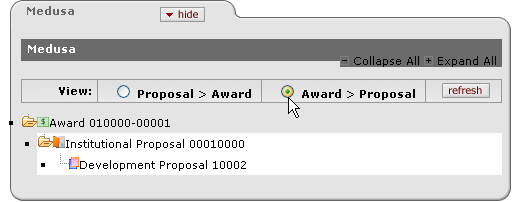
The Streams page of the Proposal Development document displays related document relationships, when available. It includes two sections:
• View: Allows for selection of Proposal>Award or Award>Proposal options and a refresh button that refreshes the tree view below this section based on your selection.
• Tree: Displays a hierarchical view of related documents that you can expand and collapse to see their relationships.
|
|
Default View: By default, Streamlyne Research displays the Proposal to Award view of the hierarchy tree upon first display of the Streams section for a Proposal Development document. Document IDs are by default sorted in ascending order. |

|
Field/Element |
Description |
|
Collapse All Expand All |
Click Expand All to open all folders and display all branches and documents in the hierarchy, click Collapse All to close them. |
|
View: |
Select the radio button |
|
Refresh button |
Click the refresh |
|
Folder/document icons |
The folder icon appears as an open folder with a minus symbol on it when open, and when closed, a plus symbol. The type of document is reflected by a visual icon symbol (for example, Award has a green background and a dollar sign). |
|
Document links |
Click on a document link to display a subsection under it containing summarized details and identifying information about the document. |
 by clicking within a circle to
place a dot within it to indicate your selection of the desired
option.
by clicking within a circle to
place a dot within it to indicate your selection of the desired
option. button to update the tree view
based on your View field option selection.
button to update the tree view
based on your View field option selection.Streamlyne Research links an Institutional Proposal to zero or more Development Proposals. There is a one to one relationship between versioned Institutional Proposals and Development Proposals when the Institutional proposal comes from a development proposal. Since the Streams hierarchy does not distinguish between versions the development proposals will appear to relate to one Institutional Proposals.
View Summary Details
When you have appropriate permission, links allow you to “drill down” to additional details, and open the documents from the Streams section.